Basics
Computations that use multi-processor computers and several
independent computers interconnected in some way, working together on a common task is called Parallel Computing. It is a form of computation in which many calculations are carried out simultaneously, operating on the principle that large problems can often be divided into smaller ones, which are then solved concurrently i.e in parallel. There are several different forms of parallel computing: bit-level, instruction level, data, and task parallelism. Parallel computing has become the dominant paradigm in computer architecture, mainly in the form of multi-core processors.
Main memory in a parallel computer is either shared memory or distributed memory. Distributed memory refers to the fact that the memory is logically distributed, but often implies that it is physically distributed as well.Accesses to local memory are typically faster than accesses to non-local memory.
Which Parallelis is supported and why ?
Instruction-level parallelism (ILP) is supported by in some systems because
1. Multiple instructions from the same instruction stream can be executed
concurrently
2. Generated and managed by hardware (superscalar) or by compiler (VLIW)
3. Limited in practice by data and control dependences
Thread-level parallelism (TLP) is supported by in some systems because
1. Multiple threads or instruction sequences from the same application can be
executed concurrently
2. Generated by compiler/user and managed by compiler and hardware
3. Limited in practice by communication/synchronization overheads and by
algorithm characteristics
Granularity
In parallel computing, granularity is a qualitative measure of the ratio of computation to communication.
Fine-grain Parallelism:
1. Relatively small amounts of computational work are done between communication events.
2. Low computation to communication ratio
3. Facilitates load balancing
4. Implies high communication overhead and less opportunity for performance enhancement
If granularity is too fine it is possible that the overhead required for communications and synchronization between tasks takes longer than the computation.
Coarse-grain Parallelism:
1. Relatively large amounts of computational work are done between communication/synchronization events
2. High computation to communication ratio
3. Implies more opportunity for performance increase
4. Harder to load balance efficiently
Which is Best?
The most efficient granularity is dependent on the algorithm and the hardware environment in which it runs.In most cases the overhead associated with communications and synchronization is high relative to execution speed so it is advantageous to have coarse granularity.Fine-grain parallelism can help reduce overheads due to load imbalance.
Interprocess Communication (IPC)
In computing, inter-process communication (IPC) is a set of methods for the exchange of data among multiple threads in one or more processes. Processes may be running on one or more computers connected by a network.
IPC enables one application to control another application, and for several applications to share the same data without interfering with one another. IPC is required in all multiprocessing systems, but it is not generally supported by single-process operating systems such as DOS. OS/2 and MS-Windows support an IPC mechanism called DDE .
Using DDE for IPC
DDE is a protocol that enables applications to exchange data in a variety of formats. Applications can use DDE for one-time data exchanges or for ongoing exchanges in which the applications update one another as new data becomes available.
Some of the IPC methods are :
1. Socket - A data stream sent over a network interface, either to a different process on the same computer or to another computer and is provided by most os like windows, posix, unix.
2.Message Queue -An anonymous data stream similar to the pipe, but stores and retrieves information in packets and is provided by os like windows and all posix systems.
3. Semaphore -A simple structure that synchronizes threads or processes acting on shared resources and is provided by windows and all posix systems.
UNIX FOR MULTIPROCESSOR SYSTEM
The UNIX operating system for a multiprocessor system has some additional features as compared to the normal UNIX operating system.The OS functions including processor scheduling, virtual memory management, I/O devices etc, are implemented with a large amount of system software. Normally the size of the OS is greater than the size of the main memory. The portion of OS that resides in
the main memory is called kernel. For a multiprocessor, OS is developed on three models.These UNIX kernels are implemented with locks semaphores and monitors.
1) Master slavekernel:In this model, only one of the processors is designated as
Master.
The master is responsible for the following activities:
i) running the kernel code
ii) handling the system calls
iii) handling the interrupts.
The rest of the processors in the systemrun only the user code and are called slaves.
2) Floating-Executive model: The master-slave kernel model is too restrictive in the
sense that only one of the processors viz the designated master can run the kernel.
This restriction maybe relaxed by having more than one processors capable of
running the kernel and allowing additional capability by which the master mayfloat
among the various processors capable of running the kernel.
3) Multi-threaded UNIX kernel:We know that threads are light-weight processors
requiring minimal state information comprising the processor state and contents of
relevant registers. A threadbeing a (light weight) process is capable of executing
alone. In a multiprocessor system, morethan one processors may execute
simultaneously with each processor possibly executing more than one threads.
Compilers
The best compilers to use in terms of code execution speed is gcc
On the old Itaniums (all except lobster6) these are called with efc/ecc
Documentation sources in order of increasing complexity:
[ifort/icc/icpc] -help" will show notes about using the compiler.
man [ifort/icc/icpc] will display informative manual pages on compiler flags/usage
Fortran v8.1 and C/C++ v8.1 documentation
GCC (GNU Compiler Collection)
Currently contains front ends for C, C++, Objective-C, Fortran, Java, and Ada, as well as libraries for these languages (libstdc++, libgcj,...).
In addition, G95 is installed on porcupine and the cluster at /usr/bin/g95. It has a resume from dump feature that can be signal initiated, as well as an extensive environment configuration.
BY-
Shubham Gupta
336/CO/11
Saturday, 3 May 2014

Friday, 2 May 2014
Wednesday, 30 April 2014
Supercomputers and changing times
A supercomputer is a computer at the frontline of contemporary processing capacity particularly speed of calculation which can happen at speeds of nanoseconds.
Supercomputers play an important role in the field of computational science, and are used for a wide range of computationally intensive tasks in various fields, including quantum mechanics, weather forecasting, climate research, oil and gas exploration, molecular modeling (computing the structures and properties of chemical compounds, biological macromolecules, polymers, and crystals), and physical simulations (such as simulations of the early moments of the universe, airplane and spacecraft aerodynamics, the detonation of nuclear weapons, and nuclear fusion).
Supercomputing, in the broadest sense, is about finding the perfect combination of speed and power, even as the definition of perfection changes as technology advances. But the single biggest challenge in high-performance computing (HPC) is now on the software side: Creating code that can keep up with the processors.
The history of supercomputing goes back to the 1960s .During those days the main idea was to use innovative designs and parallelism to achieve superior computational peak performance. While the supercomputers of the 1980s used only a few processors, in the 1990s, machines with thousands of processors began to appear both in the United States and in Japan, setting new computational performance records. Moore's Law is a famous "rule" of computer science which states that processing power will double every 1.5-2 years and it has held true for over 50 years. By the end of the 20th century, massively parallel supercomputers with thousands of "off-the-shelf" processors similar to those found in personal computers were constructed and broke through the teraflop computational barrier. Progress in the first decade of the 21st century was dramatic and supercomputers with over 60,000 processors have appeared.
Here is the performance of the fastest supercomputer in the world, the past 15 years:
· Top in 2010: 2.57 petaflops
· Top in 2005: 280.6 teraflops
· Top in 2000: 4.94 teraflops
· Top in 1995: 170 gigaflops
One of the challenges to faster supercomputers is designing an operating system capable of handling that many calculations per second.Other important trends which can be identified include emphasis on having open, rather than proprietary, systems, and the growing awareness of energy efficiency as a requirement.
According to top scientists emphasis is shifting a little away from the speed/power paradigm and toward addressing software challenges. "What matters is not acquiring the iron, but being able to run code that matters". Rather than increasing the push to parallelize codes, the effort is on efficient use of codes.
Sources:
http://en.wikipedia.org/wiki/History_of_supercomputing
http://royal.pingdom.com/2010/12/02/incredible-growth-supercomputing-performance-1995-2010/
Varun Singla 363/CO/11
HOW DOES INTERNET WORK
Internet is a global system of interconnected computer networks that use the standard Internet protocol suite (TCP/IP) to link several billion devices worldwide. It is a networks of networks that consists of millions of private, public, academic, business, and government networks, of local to global scope, that are linked by a broad array of electronic, wireless, and optical networking technologies. The Internet carries an extensive range of information resources and services.
Internet is a global network of computers each computer connected to the Internet must have a unique address. Internet addresses are in the form nnn.nnn.nnn.nnn where nnn must be a number from 0 - 255. This address is known as an IP address.
The picture below illustrates two computers connected to the Internet; our computer with IP address 1.2.3.4 and another computer with IP address 5.6.7.8. The Internet is represented as an abstract object in-between.

| Diagram 1 |
If we connect to the Internet through an Internet Service Provider (ISP), we are usually assigned a temporary IP address for the duration of our dial-in session. If we connect to the Internet from a local area network (LAN) our computer might have a permanent IP address or it might obtain a temporary one from a DHCP (Dynamic Host Configuration Protocol) server. In any case, if we are connected to the Internet, our computer has a unique IP address.
Servers are where most of the information on the internet "lives". These are specialised computers which store information, share information with other servers, and make this information available to the general public.
Browsers are what people use to access the World Wide Web from any standard computer.
When we connect our computer to the internet, we are connecting to a special type of server which is provided and operated by our Internet Service Provider (ISP). The job of this "ISP Server" is to provide the link between our browser and the rest of the internet. A single ISP server handles the internet connections of many individual browsers - there may be thousands of other people connected to the same server that we are connected to right now.
The picture below show a slightly larger slice of the internet:


The ISP maintains a pool of modems for their dial-in customers. This is managed by some form of computer which controls data flow from the modem pool to a backbone or dedicated line router. This setup may be referred to as a port server, as it 'serves' access to the network. Billing and usage information is usually collected here as well.
After our packets traverse the phone network and ISP's local equipment, they are routed onto the ISP's backbone or a backbone the ISP buys bandwidth from. From here the packets will usually journey through several routers and over several backbones, dedicated lines, and other networks until they find their destination.
The information used to get packets to their destinations are contained in routing tables kept by each router connected to the Internet.
Routers are packet switches. A router is usually connected between networks to route packets between them. Each router knows about it's sub-networks and which IP addresses they use.
INTERNET PROTOCOL
TCP/IP is the basic communication language or protocol of the Internet. It can also be used as a communications protocol in a private network (either an intranet or an extranet). When we are set up with direct access to the Internet, computer is provided with a copy of the TCP/IP program just as every other computer that we may send messages to or get information from also has a copy of TCP/IP.
TCP/IP is a two-layer program. The higher layer, Transmission Control Protocol, manages the assembling of a message or file into smaller packets that are transmitted over the Internet and received by a TCP layer that reassembles the packets into the original message. The lower layer, Internet Protocol, handles the address part of each packet so that it gets to the right destination. Each gateway computer on the network checks this address to see where to forward the message. Even though some packets from the same message are routed differently than others, they'll be reassembled at the destination.
http://www.mediacollege.com/internet/intro/thewww2.html
http://en.wikipedia.org/wiki/Internet
http://www.stanford.edu/class/msande91si/www-spr04/readings/week1/InternetWhitepaper.htm
http://searchnetworking.techtarget.com/definition/TCP-IP
Varun Singla 363/CO/11
CACHE COHERENCE AND SNOOPY BUS PROTOCOL
In computing, cache coherence refers to the consistency of data stored in local caches of a shared resource. When clients in a system maintain caches of a common memory resource, problems may arise with inconsistent data. This is particularly true of CPUs in a multiprocessing system. In a memory hierarchy for a multiprocessor system, data inconsistency may occur between adjacent levels or within the same level. For example, the cache and main memory may contain inconsistent copies of the same memory block because multiple processors operate asynchronously and independently. When multiple processors maintain locally cached copies of a unique shared-memory location, any local modification of the location can result in a globally inconsistent view of memory. Cache coherence schemes prevent this problem by maintaining a uniform state for each cached blocks of data.
SNOOPY BUS PROTOCOL
In computing a snoopy cache is a type of memory cache that performs bus sniffing. Such caches are used in systems where many processors or computers share the same memory and each have their own cache. Snoopy protocols achieve data consistency among the caches and shared memory through a bus watching mechanism.
There are 2 basic approaches
1. write-invalidate – invalidate all other cached copies of a data object when the local cached copy is modified (invalidated items are sometimes called "dirty")
2. write-update – broadcast a modified value of a data object to all other caches at the time of modification
Snoopy bus protocols achieve consistency among caches and shared primary memory by requiring the bus interfaces of processors to watch the bus for indications that require updating or invalidating locally cached objects
Cache consistency by bus watching mechanism
- Each cache watches bus for write operations
- Write through: forward write immediately to memory
- Write-invalidate: cache copies are invalidated.
- Write-update: cache copies are updated.
- Disadvantage: high bus traffic.
- Copy back: write modified cache line only back if
- Line needs to be replaced, or
- Another processor reads data.

Initial state consistent caches

After Write-Invalidate by P1

After Write-Update by P1
Sources:
http://www.risc.jku.at/education/courses/ws97/intropar/architectures/index_5.html
http://www.icsa.inf.ed.ac.uk/research/groups/hase/models/coherence/
http://www.info425.ece.mcgill.ca/lectures/L28-SnoopyCoherence.pdf
Varun Singla 363/CO/11
Graphs of Pthread Programs
1. Pi Mutex
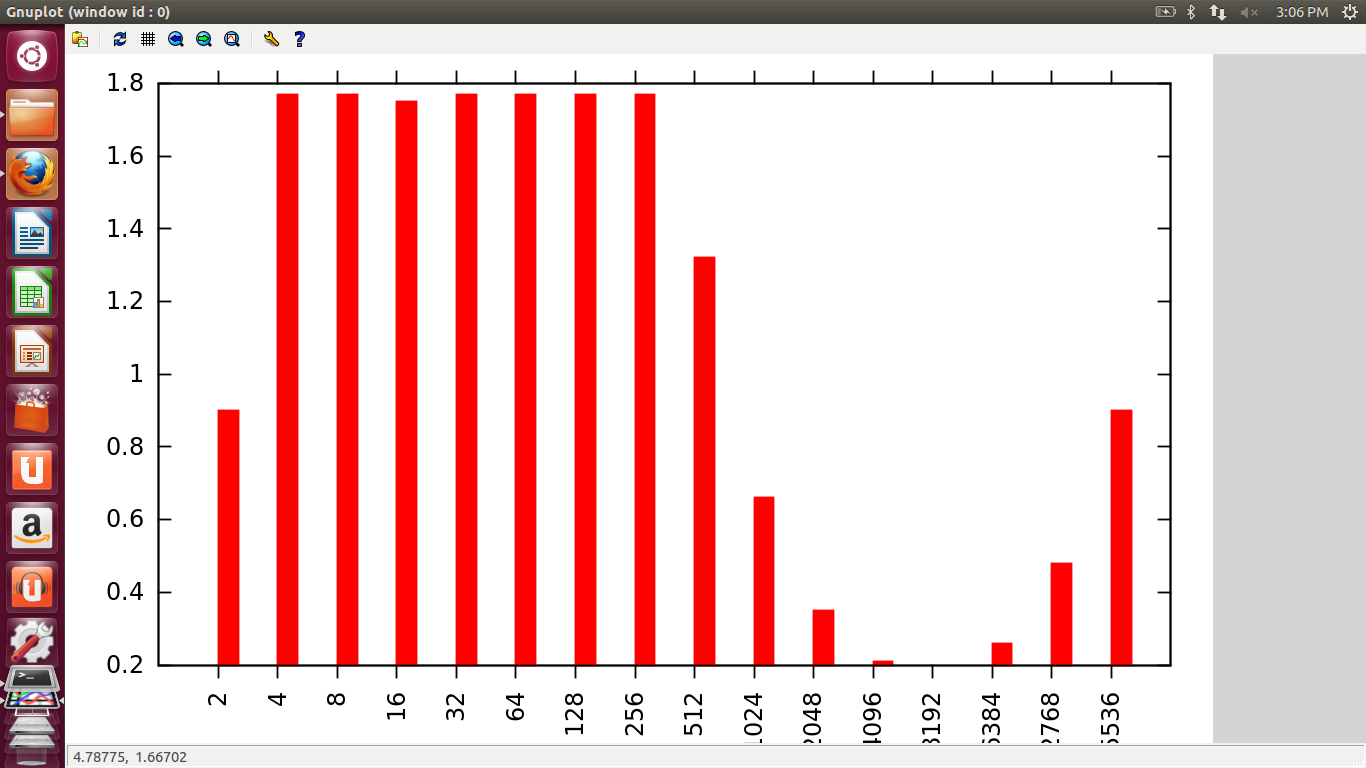
In this graph, initially time increases as number of threads increases, but eventually time decreases as number of threads increase because as we increase the number of threads work is divided and so time of execution decreases and at one point almost becomes zero or minimum because at this point equal work is done by all threads and there are minimum overheads. This is the optimum value of number of threads. But then after this, the graph gradually increases because now the work is less but the number of threads is quite large which results in increased overheads and hence increases the time of execution.
2. Pi Busywait
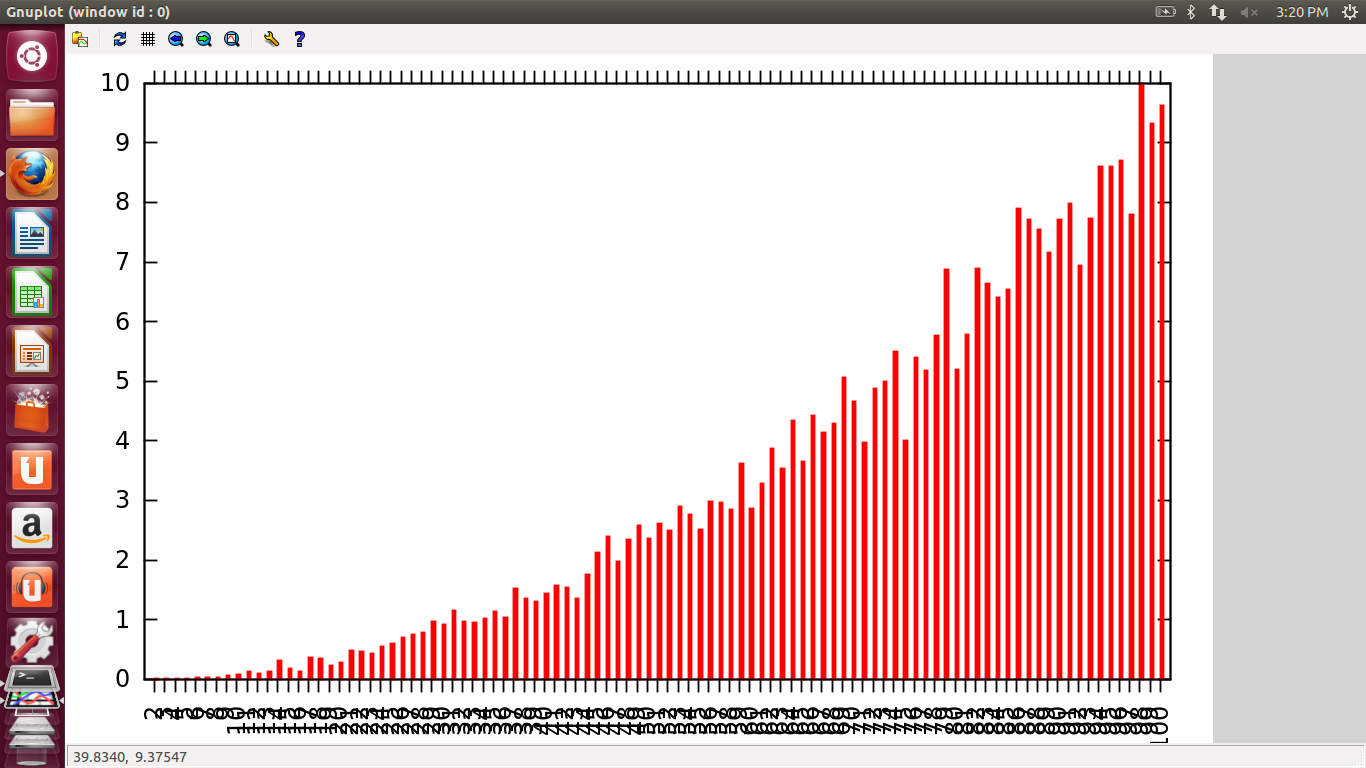
Here, time increases as number of threads increase as every thread is looping in an infinite loop. So as number of threads increases number of cpu cycles increases which increases the overall time.
3. Matrix Multiplication
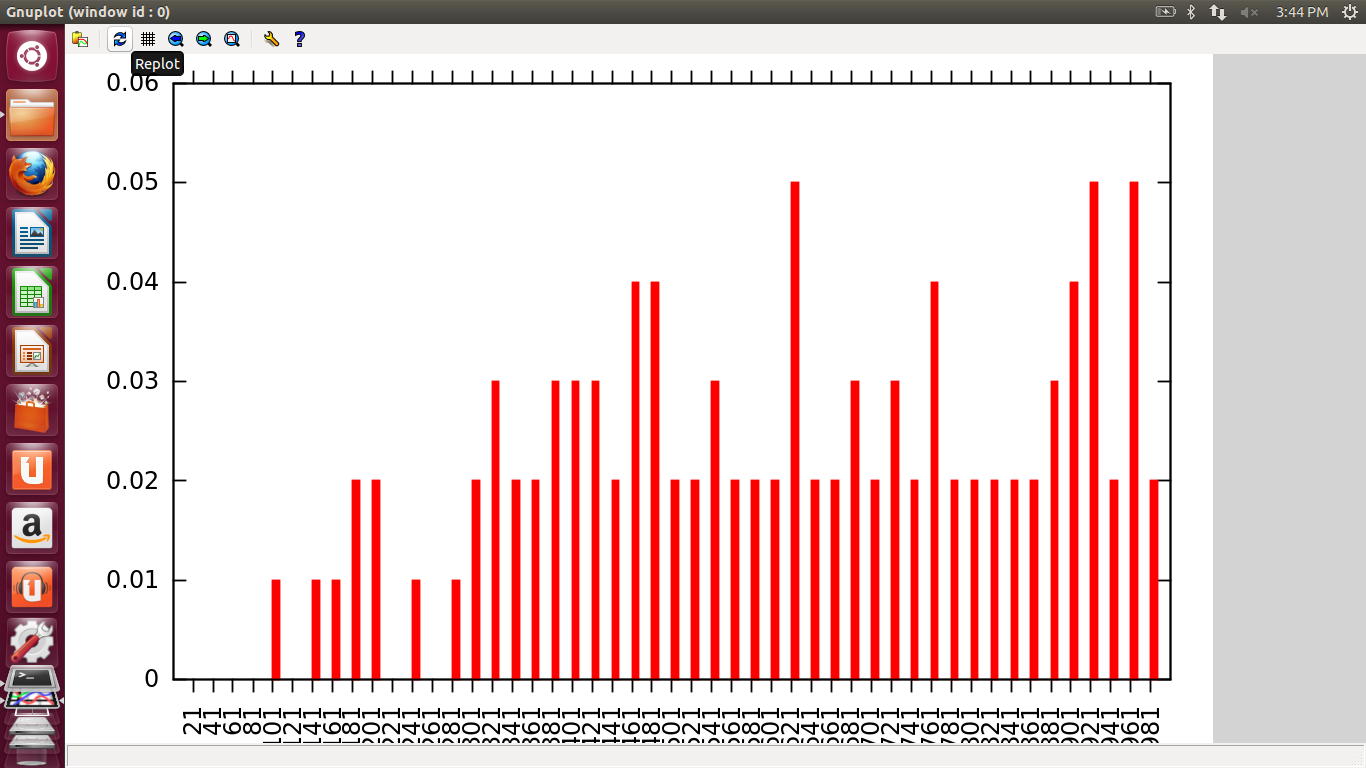
Here, when size of array is small, as the no of threads increase, the time rise is very steep because there is no point in parallelizing such small work. Overheads are more in this case.
When we increase the size of array to a high value, d graph does not rise as fast as was the case before because now each thread is working in parallel n work is distributed equally among all so time of execution is less. But when number of threads is more than what is required time increases because of overheads.
4. Barrier Semaphores
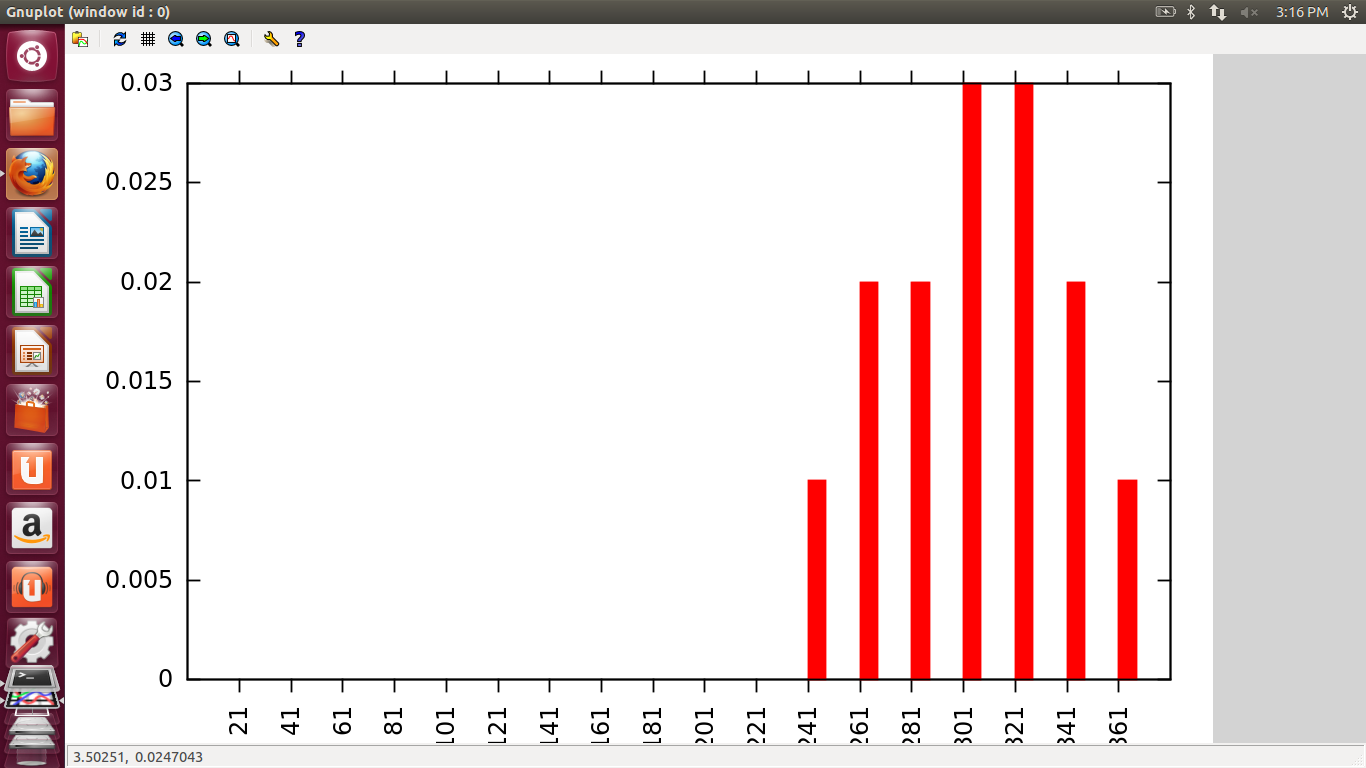
Here, graph could not be seen properly because number of threads could not be increased after a certain point because OS would not allow it. So the actual graph could not be obtained but it was seen that for very few number of threads time was almost zero n at high values of no. of threads time increases to a great extent.
5. Barrier Mutex

Here, the graph increases linearly with the number of threads.
6. Conditional Barrier
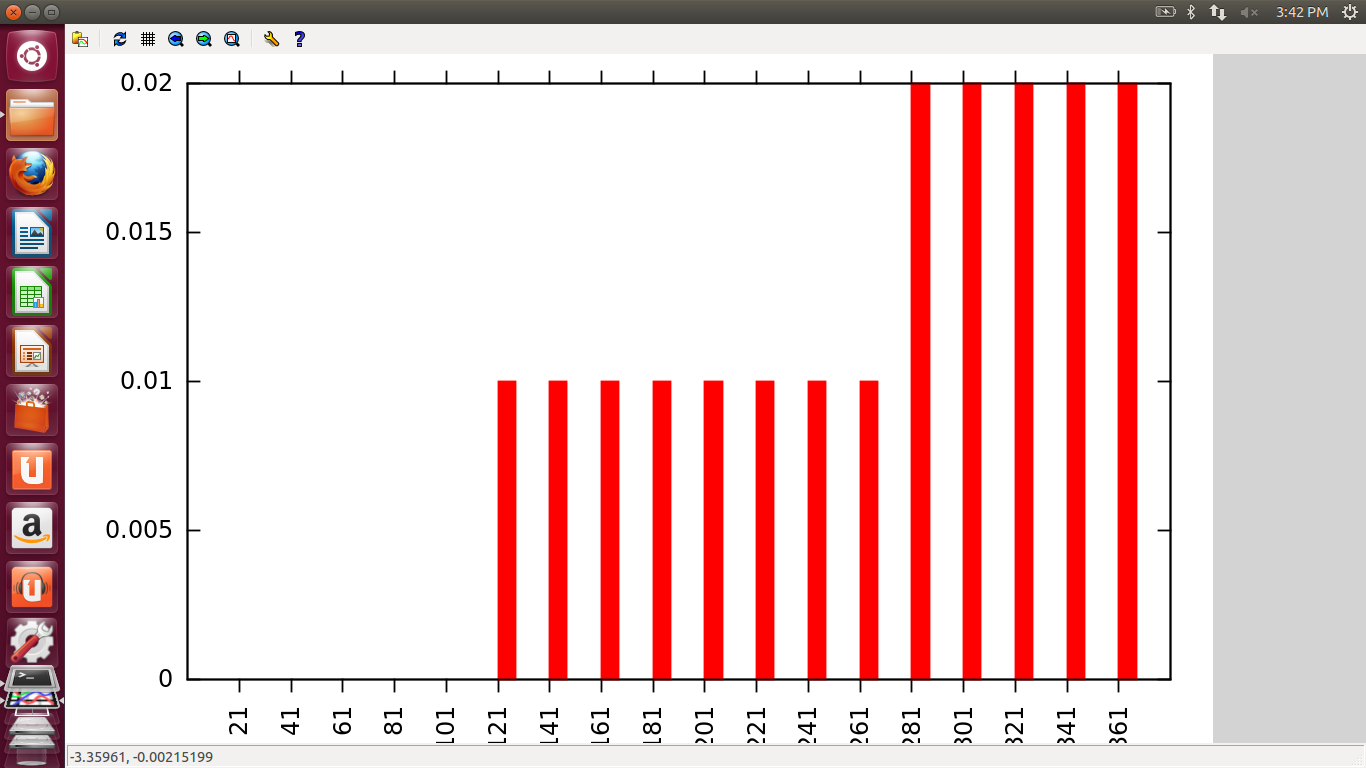
Here also, graph could not be seen properly because number of threads could not be increased after a certain point because OS would not allow it. So the actual graph could not be obtained. But it was seen that for very few number of threads time was almost zero and at high values of number of threads time increases to a great extent.
7. Cout v/s Std
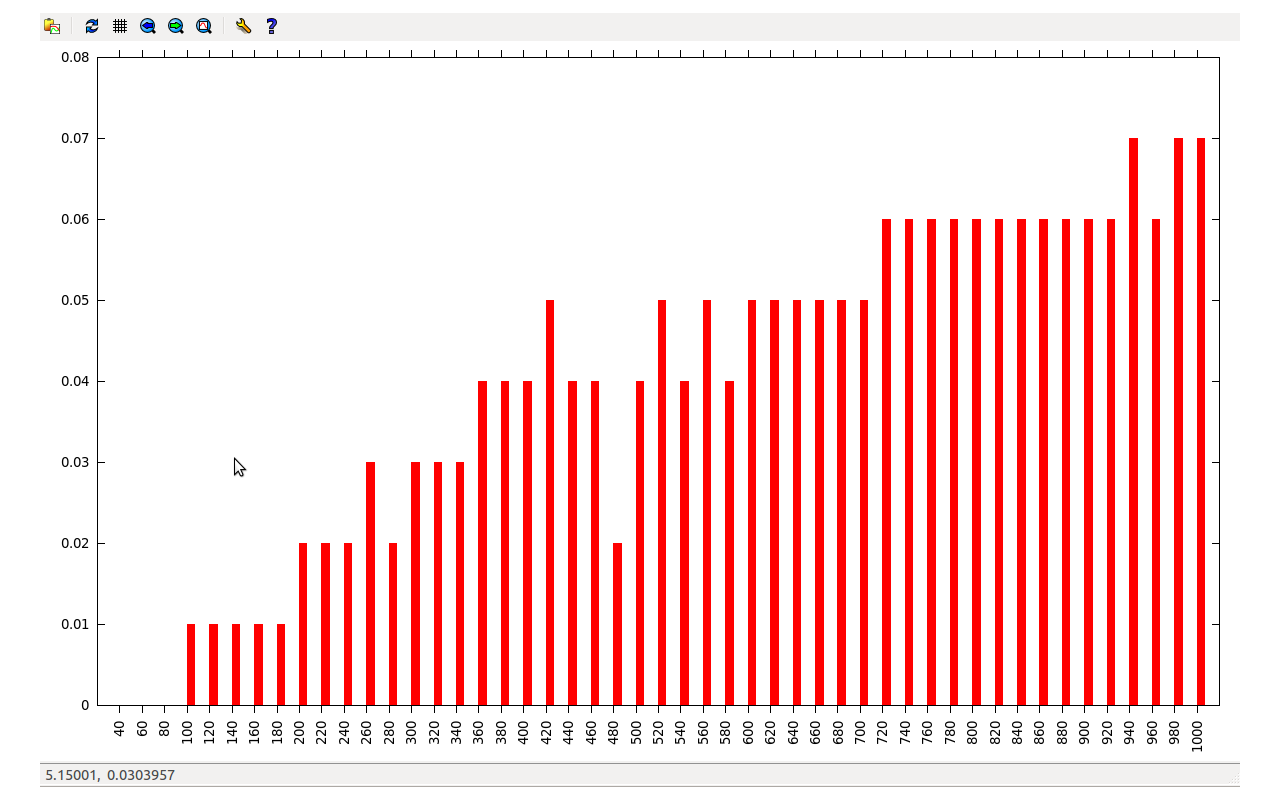
Here, the graphs just show that std is faster that cout.
VIVEK SEHGAL 374/CO/11
VIREN GULATI 369/CO/11
Subscribe to:
Posts (Atom)